Purchase 1: with request for customer's consent and redirection
When performing a purchase, the customer initiates a purchase, chooses the payment method, provides consent, and is then redirected to complete the purchase.
| Countries and regions | Basic availability: AT, BE, ES, DE, GR, HU, IT, IE, LT, LV, NL, NO, PL, PT |
| Payment currencies | Basic availability: EUR (for AT, BE, ES, DE, GR, IT, IE, LT, NL, PL, PT, RO), HUF (for HU), NOK (for NO), PLN (for PL) |
| Payment amount limits | Contact your key account manager at Benker for details. Also you can check the payment amount limits in your project by using Dashboard. |
| Payment processing time | Contact your key account manager at Benker for details. |
| Currency conversion | Contact your key account manager at Benker for details. |
| Refund |  |
| Onboarding and access fee | Contact your key account manager at Benker for details. |
Special considerations
| |
Operations support
| Interfaces | |||
|---|---|---|---|
| Payment Page | Gate | Dashboard | |
| Purchase |  |
|
|
You can check the payment amount limits in your project by using Dashboard. To check your payment amount limits, go to Dashboard, select the Projects section, and then click the Payment methods tab.
The following sections provide more information about the payment processing flow and the analysis of completed payments.
Purchase by using Payment Page
General information
To perform a purchase by using Payment Page with the Open Banking payment method:
- Send a request with all the required parameters and signature to the Benker URL.
- Accept the callback with the purchase result from the payment platform.
The following figure shows the complete purchase processing flow in the Open Banking payment method.
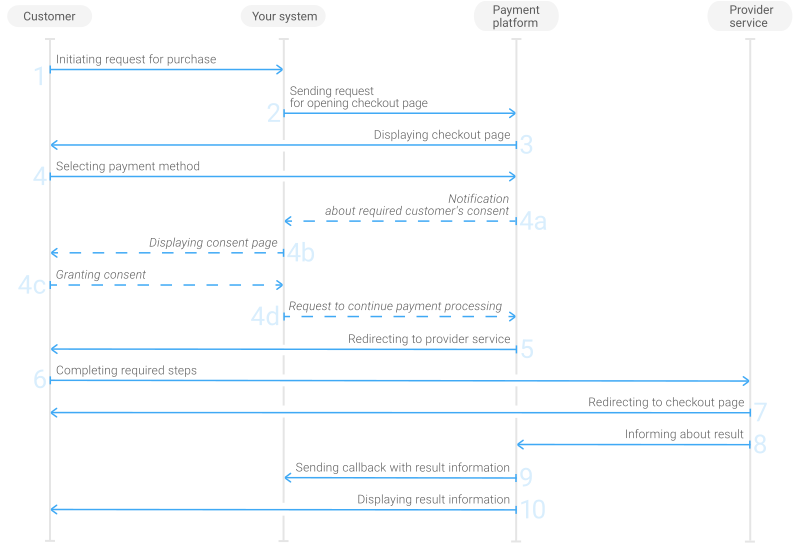
- The customer initiates a purchase in your system.
- Your system sends the request for the purchase through Payment Page to the Benker URL.
- The checkout page is displayed to the customer.
- The customer chooses to make a purchase with the Open Banking payment method. The payment platform processes the received request, identifying the need to obtain additional customer consent and additional information about the customer. If such consent (and information) is required, the following steps are followed:
- The payment platform sends information about the need for customer's consent and additional information (if needed) to Payment Page.
- Payment Page displays to the customer a page with information about the need for customer's consent and additional information (if needed).
- The customer gives their consent, provides the necessary information (if requested), and confirms purchase processing.
- Payment Page sends the information provided by the customer to the payment platform.
- The checkout page redirects the customer to the provider service.
- The customer completes the purchase.
- The customer is redirected back to the checkout page.
- The provider service sends the purchase result information to the payment platform.
- The payment platform sends a callback with the payment result to your system.
- The payment platform displays the payment result to the customer on the checkout page.
Request
The following table lists the parameters that you have to include in the request for purchase through the checkout page with the Open Banking payment method.
|
||
|---|---|---|
| Parameter | Description | |
project_id | Project ID you obtained from Benker when integrating. Example: | |
payment_id | Payment ID unique within your project. Example: | |
customer_id | Unique ID of the customer within your project. Example: | |
customer_first_name | Customer's first name. Example: | |
customer_last_name | Customer's last name. Example: | |
customer_email | Customer email address. Contact Benker support team to confirm if this parameter is required for you. Example: | |
customer_account_number | Additionally, when selecting certain banks the customer can be required to specify the International Bank Account Number (IBAN) on Payment Page, while selecting other banks the IBAN is specified on the provider side. Due to the specifics of the payment methods this number can only be specified by the customer separately and can't be used in requests.Example: | |
payment_currency | Code of the payment currency in the ISO-4217 alpha-3 format.
Example: | |
payment_amount | Payment amount in minor currency units without any decimal point or comma except for the cases when the currency doesn't have any minor currency units. If the currency doesn't have any minor units (i.e. the number of digits for minor currency units is zero), set this parameter to the amount in the major currency units. To check whether the currency has any minor units, see Currency units and Currency codes. Example: 100.00 EUR must be sent as | |
force_payment_method | Parameter that allows you to enforce the Open Banking payment method for your customer and skip the page with payment method selections. To enforce the Open Banking payment method and skip the page with payment method selection, add the force_payment_method parameter to the request and set its value to Example: | |
merchant_return_url | It is recommended to specify in the request the merchant_return_url parameter with the URL for redirecting the customer to your system, so that the customer can return to your system by clicking the corresponding button on the payment form in case the customer does not grant their consent for payment processing.Example: | |
signature | Signature created after you've specified all the request parameters. For more information about signature generation, see Signature generation and verification. | |
| You can also add any other optional parameters to the request, if necessary. For the list of all the parameters possible in requests to Payment Page, see Parameters for opening the payment form. | ||
Here is an example of the data from a request to open the checkout page by using
EPayWidget:
EPayWidget.run(
	{
		project_id: 1234,
		payment_id: 'payment_47',
		customer_id: 'customer_123',
		customer_first_name: 'John',
		customer_last_name: 'Doe',
		customer_email: 'johndoe@example.com',
		customer_account_number: 'DE89370400440532013000',
		payment_currency: 'EUR',
		payment_amount: 10000,
		force_payment_method: 'open-banking',
		merchant_return_url: 'http://example.com/return',
		signature: 'kUi2x9dKHAVNU0FYldJrxh4yo+52Kt8KU+Y19vySO/RLUkDJrOcZzUCwX6R/ekpZhkIQg=='
	}
)
Displaying bank icons on the checkout page
In the Open Banking payment method, the payments are performed through specific banks. When making a purchase on the checkout page, the customer first chooses a payment method and then selects the bank.
The Open Banking payment method offers several options to display bank icons on the checkout page:
- Choosing the bank in two steps First, the customer chooses Open Banking among other payment methods, and then selects the bank from the list by entering either the name of the bank or the International Bank Account Number (IBAN). This is the default behavior.
- Displaying only banks of the Open Banking payment method For the customer to see only banks available in the Open Banking payment method (without other payment methods), add the force_payment_method parameter to the request and set it to
open-banking. - Enforcing only one bank If you want the customer to go directly to their bank service to complete the payment (without choosing a payment method and bank on the checkout page), use the force_payment_method parameter with the
open-bankingvalue in the request, add the payment_extra_param parameter, as well as account_bank_id parameter containing the ID of the required bank. More information about bank IDs can be found at Banks available for purchase.Note: Please contact the Benker support team to set the value of payment_extra_param parameter.Here is an example of the data from a request to open the checkout page with one preselected bank by using
EPayWidget.Figure 2. Example of the data from a request to open the checkout page with one preselected bank EPayWidget.run( { project_id: 1234, payment_id: 'payment_47', customer_id: 'customer_123', customer_first_name: 'John', customer_last_name: 'Doe', customer_email: 'johndoe@example.com', payment_currency: 'EUR', payment_amount: 10000, force_payment_method: 'open-banking', payment_extra_param: 'deeplink', account_bank_id: '12345', signature: 'kUi2x9dKHA5VNU0FY...vySO/RLCv1htT4DqtVUkDJrOcZzUCwX6Rek7pZhkIQg==' } )
Callback
In the Open Banking payment method, the payment platform returns the purchase result in a callback. For the information about the callback structure, see Callbacks.
The following is an example of a callback body with information about a successfully completed purchase.
{
    "project_id": 1234,
    "payment": {
        "id": "payment_47",
        "type": "purchase",
        "status": "success",
        "date": "2024-12-07T19:08:45+0000",
        "method": "open-banking",
        "sum": {
            "amount": 10000,
            "currency": "EUR"
        },
        "description": ""
    },
    "customer": {
        "id": "customer_123"
    },
    "operation": {
        "id": 47,
        "type": "sale",
        "status": "success",
        "date": "2024-12-07T19:08:45+0000",
        "created_date": "2024-12-07T19:08:05+0000",
        "request_id": "1a23456bc7890de",
        "sum_initial": {
            "amount": 10000,
            "currency": "EUR"
        },
        "sum_converted": {
            "amount": 10000,
            "currency": "EUR"
        },
        "code": "0",
        "message": "Success",
        "provider": {
            "id": 12345,
            "payment_id": "123abc123-123",
            "auth_code": ""
        }
    },
    "signature": "U7HQO7ToISZhMPKdM4XrUKQtoYzFvoB3cs9CRd4xeYG2Q=="
}
The following is an example of a callback for a declined purchase.
{
    "project_id": 1234,
    "payment": {
        "id": "payment_47",
        "type": "purchase",
        "status": "decline",
        "date": "2024-12-07T19:08:45+0000",
        "method": "open-banking",
        "sum": {
            "amount": 10000,
            "currency": "EUR"
        },
        "description": ""
    },
    "customer": {
        "id": "customer_123"
    },
    "operation": {
        "id": 47,
        "type": "sale",
        "status": "decline",
        "date": "2024-12-07T19:08:45+0000",
        "created_date": "2024-12-07T19:08:05+0000",
        "request_id": "1a23456bc7890de",
        "sum_initial": {
            "amount": 10000,
            "currency": "EUR"
        },
        "sum_converted": {
            "amount": 10000,
            "currency": "EUR"
        },
        "code": "20000",
        "message": "General decline",
        "provider": {
            "id": 12345,
            "payment_id": "123abc123-123",
            "auth_code": ""
        }
    },
    "signature": "U7HQO7ToISZhMPKdM4XrUKQtoYzFvoB3cs9CRd4xeYG2Q=="
}
Purchase by using Gate
General information
To perform a purchase by using Gate with the Open Banking payment method:
- Send a request with all the required parameters and signature to the Benker URL.
- Receive a callback with the data you're required to submit.
- Send a request with the data to the Benker payment platform.
- Accept the callback with the purchase result from the payment platform.
The following figure provides the details of the purchase processing flow in the Open Banking payment method.
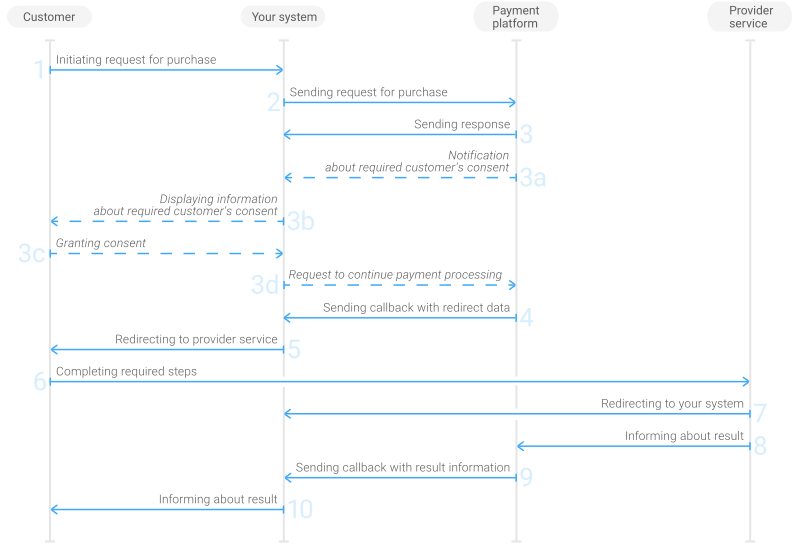
- The customer initiates a purchase in your system.
- Your system sends the purchase request to the Benker payment platform.
- The payment platform sends you a response in which it acknowledges your request and provides the request validation result (for more information about the response format, see Response format). The payment platform processes the received request, identifying the need to obtain additional customer consent and additional information about the customer. If such consent (and information) is required, the following steps are followed:
- The payment platform sends you information about the need for customer's consent and additional information (if needed).
- Your system displays a page with information about the need for customer's consent and additional information (if needed) to the customer.
- The customer gives their consent, provides the necessary information (if requested), and confirms purchase processing.
- Your system sends the information provided by the customer to the payment platform.
- The checkout page redirects the customer to the provider service.
- The customer is redirected back to the checkout page.
- The customer completes the purchase.
- The customer is redirected to your system.
- The provider service informs the payment platform about the purchase result.
- The payment platform sends the callback with the payment result to your system.
- Your system sends the payment result to the customer.
Request
This section provides the instructions on how to build the request for purchase with the Open Banking payment method.
| HTTP request method | POST |
| Request body format | JSON |
| API endpoint | /v2/payment/open-banking/sale |
|
|||
|---|---|---|---|
| Object | Parameter | Description | |
general | project_id | Project ID you obtained from Benker when integrating. Example: | |
payment_id | Payment ID unique within your project. Example: | ||
signature | Signature created after you've specified all the request parameters. For more information about signature generation, see Signature generation and verification. | ||
customer | id | Unique ID of the customer within your project. Example: | |
ip_address | IP address of the customer's device. Example: | ||
first_name | Customer's first name. Example: | ||
last_name | Customer's last name. Example: | ||
email | Customer email address. Contact Benker support team to confirm if this parameter is required for you. Example: | ||
language | The language code of the payment page. Example: | ||
account | number | In some cases, taking into account the specifics of the bank used, the customer may be required to specify the International Bank Account Number (IBAN) on your system side, while in other cases this number is specified by the customer on the provider side or bank side. At the same time, due to the specifics of the group’s methods, even if the customer account number is indicated in the initial request, it is not taken into account during the initial processing of this request and can be requested separately. Example: | |
bank_id | Customer's bank id. Example: | ||
bank_code | In some cases, taking into account the specifics of the bank used, the customer may be required to specify the bank code on your system side. Example: | ||
payment | currency | Code of the payment currency in the ISO-4217 alpha-3 format. Example: | |
amount | Payment amount in minor currency units without any decimal point or comma except for the cases when the currency doesn't have any minor currency units. If the currency doesn't have any minor units (i.e. the number of digits for minor currency units is zero), set this parameter to the amount in the major currency units. To check whether the currency has any minor units, see Currency units and Currency codes. Example: 100.00 EUR must be sent as | ||
description | Description. Example: | ||
return_url | success | The URL to redirect the customer to after the payment is successfully completed. Example: | |
decline | The URL to redirect the customer to after the payment is declined. Example: | ||
return | The URL to redirect the customer to when they prematurely terminate the payment. This URL is also used if the success and decline parameters are not specified in the request. If you don't specify any parameters of the return_url object in the request, by default Gate will redirect the customer to the URL specified in your project in Benker. Example: | ||
| You can also add any other optional parameters to the purchase request, if necessary. For the list of all the parameters available in Gate, see API Reference. | |||
Here is an example of the data from a request to initiate a purchase with the Open Banking payment method:
{
    "general": {
        "project_id": 1234,
        "payment_id": "payment_47",
        "signature": "kUi2x9dKHAVNU0FYldJrxh4yo+52Kt8KU+Y19vySO/RLUkDJrOcZzUCwX6R/ekpZhkIQg=="
    },
    "customer": {
        "id": "customer_123",
        "ip_address": "198.51.100.47",
        "first_name": "John",
        "last_name": "Doe",
        "email": "johndoe@example.com",
        "language": "EN"
    },
    "account": {
        "number": "DE89370400440532013000",
        "bank_id": "593123456789",
        "bank_code": "1234567890"
    },
    "payment": {
        "currency": "EUR",
        "amount": 10000,
        "description": "Description"
    },
    "return_url": {
        "success": "https://example.com/success/",
        "decline": "https://example.com/decline/",
        "return": "https://example.com/return/"
    }
}
Intermediate callbacks
Formats for intermediate callbacks and requests for obtaining consent and additional information
In cases where it is necessary to obtain additional consent from the customer and, if relevant, additional information, an intermediate callback containing the clarification_fields object is sent from the payment platform to your system each time. The nested objects of that object describe the specified objects and parameters necessary to process the payment. Such a callback may include:
The following is a fragment of a callback informing about the necessity of obtaining customer's consent.
{
  "clarification_fields": {
	"customer": {
	  "type": "object",
	  "description": "",
	  "properties": {
		"psu_consent": {
		  "type": "string",
		  "description": "Need to request the customer's consent to make a payment"
		},
		"psu_consent_text": {
		  "type": "string",
		  "description": "The text to be displayed on the payment form",
		  "default": "The consent text to be displayed to the customer"
		}
	  }
	}
  }
}
After you received information about customer's consent for purchase processing from the customer, send it to the payment platform in a new request. Listed below are the instructions on how to build the request with information about customer's consent for purchase processing.
| HTTP request method | POST |
| Request body format | JSON |
| API endpoint | /v2/payment/clarification |
|
||||
|---|---|---|---|---|
| Object | Object/Parameter | Description | ||
|
general |
project_id |
Project ID you obtained from Benker when integrating. Example: |
||
|
payment_id |
Payment ID unique within your project. Example: |
|||
|
signature |
Signature created after you've specified all the request parameters. For more information about signature generation, see Signature generation and verification. | |||
|
additional_data |
customer |
psu_consent |
Information about obtainment of customer's consent for purchase processing. If the customer granted their consent for purchase processing, the value for this parameter must be 1.If the customer has not provided consent, then the request to continue the payment may not be sent. In such cases, after 30 minutes (or another time, if this was configured for the project used) the payment is declined. When sending requests with a psu_consent parameter value other than 1, the customer's consent is requested again.Example: |
|
|
psu_consent_text |
The text of the request for customer's consent for purchase processing displayed to the customer. The text specified as the value of this parameter must be exactly the same as the text received in the callback informing the merchant about the necessity of obtaining customer's consent. If the specified text is different, the customer's consent is requested again. Example: |
|||
| In some cases, the customer may be required to specify additional details on your system's side. This data should be sent in a corresponding parameter within the additional_data object. For example, their last name in a customer.last_name parameter or the International Bank Account Number (IBAN) in the account.number parameter, etc. Confirm with your Benker account manager the list of necessary parameters. | ||||
Here is an example of the data from the request with information about customer's consent for purchase processing:
{
	"general": {
		"project_id": 1234,
		"payment_id": "payment_47",
		"signature": "kUi2x9dKHAVNU0FYldJrxh4yo+52Kt8KU+Y19vySO/RLUkDJrOcZzUCwX6R/ekpZhkIQg=="
	},
	"additional_data": {
		"customer": {
			"psu_consent": "1",
			"psu_consent_text": "The consent text displayed to the customer"
		}
	}
}
Customer redirection
After receiving and processing your purchase request, the payment platform sends you the callback with the data for redirecting the customer to the provider service.
To redirect the customer, use the values of the following parameters in the redirect_data object:
- url—the URL to redirect the customer to
- body—the data to send in the request body
- method—the HTTP method for retrieving the website page (for example,
POSTorGET) - encrypted—this is the service parameter. Ignore it.
Here is an example of the callback snippet with the data to redirect the customer.
"redirect_data": {
    "method": "GET",
    "body": [],
    "encrypted": [],
    "url": "https://example.com/redirect"
}
Callback
In the Open Banking payment method, the payment platform returns the purchase result in a callback. For the information about the callback structure, see Callbacks.
The following is an example of a callback body with the information about a successfully completed purchase.
{
    "project_id": 1234,
    "payment": {
        "id": "payment_47",
        "type": "purchase",
        "status": "success",
        "date": "2024-12-07T19:08:45+0000",
        "method": "open-banking",
        "sum": {
            "amount": 10000,
            "currency": "EUR"
        },
        "description": ""
    },
    "customer": {
        "id": "customer_123"
    },
    "operation": {
        "id": 47,
        "type": "sale",
        "status": "success",
        "date": "2024-12-07T19:08:45+0000",
        "created_date": "2024-12-07T19:08:05+0000",
        "request_id": "1a23456bc7890de",
        "sum_initial": {
            "amount": 10000,
            "currency": "EUR"
        },
        "sum_converted": {
            "amount": 10000,
            "currency": "EUR"
        },
        "code": "0",
        "message": "Success",
        "provider": {
            "id": 12345,
            "payment_id": "123abc123-123",
            "auth_code": ""
        }
    },
    "signature": "U7HQO7ToISZhMPKdM4XrUKQtoYzFvoB3cs9CRd4xeYG2Q=="
}
The following is an example of a callback for a declined purchase.
{
    "project_id": 1234,
    "payment": {
        "id": "payment_47",
        "type": "purchase",
        "status": "decline",
        "date": "2024-12-07T19:08:45+0000",
        "method": "open-banking",
        "sum": {
            "amount": 10000,
            "currency": "EUR"
        },
        "description": ""
    },
    "customer": {
        "id": "customer_123"
    },
    "operation": {
        "id": 47,
        "type": "sale",
        "status": "decline",
        "date": "2024-12-07T19:08:45+0000",
        "created_date": "2024-12-07T19:08:05+0000",
        "request_id": "1a23456bc7890de",
        "sum_initial": {
            "amount": 10000,
            "currency": "EUR"
        },
        "sum_converted": {
            "amount": 10000,
            "currency": "EUR"
        },
        "code": "20000",
        "message": "General decline",
        "provider": {
            "id": 12345,
            "payment_id": "123abc123-123",
            "auth_code": ""
        }
    },
    "signature": "U7HQO7ToISZhMPKdM4XrUKQtoYzFvoB3cs9CRd4xeYG2Q=="
}
Banks available for purchase
Banks available for purchase
When making payments using any of the Open Banking group methods, various banks that support this method may be involved. The request must contain the project and payment identifiers, signature, currency code, and payment amount, as shown in the example. Specify real payment data if possible. However, random values are also allowed.
If you have any questions about working with banks supported by the Open Banking methods, refer to your Benker account manager.
Request for the list of available banks
This section provides the instructions on how to build the request for the list of banks supported in the Open Banking payment method.
| HTTP request method | POST |
| Request body format | JSON |
| API endpoint |
/v2/info/banks/open-banking/sale/grouped_list
|
| Full API endpoint specification | /v2/info/banks/open-banking/sale/grouped_list |
|
|||
|---|---|---|---|
| Object | Parameter | Description | |
|
general |
project_id |
Project ID you obtained when integrating with Benker. Example: |
|
|
payment_id |
Payment ID unique within the project. If the payment is not yet created, set this parameter to a unique value. Example: |
||
|
signature |
Signature created after you specify all the required parameters. For more information about signature generation, see . | ||
|
payment |
amount |
Payment amount in minor currency units without any decimal point or comma except for the cases when the currency doesn't have any minor currency units. If the currency doesn't have any minor units (i.e. the number of digits for minor currency units is zero), set this parameter to the amount in the major currency units. To check whether the currency has any minor units, see Currency codes. Example: 100.00
EUR must be sent as |
|
|
currency |
Code of the purchase currency in the ISO-4217 alpha-3 format. Example: |
||
|
account |
country |
Customer country in the ISO 3166-1 alpha-2 format. Example: |
|
| You can also add any other optional parameters to the request, if necessary. For the list of all the parameters available in Gate, see API Reference. | |||
Here is an example of the data from the request for the list of banks available in the Open Banking payment method.
{
	"general": {
		"project_id": 200,
		"payment_id": "ORDER_155860015",
		"signature": "K6jll2ym+PtOb3ocZtr345st...=="
	},
	"payment": {
		"amount": 10000,
		"currency": "EUR"
	},
	"account": {
		"country":"GB"
	}
}
[
	{
		"minAmount": 100, // Minimum payment amount allowed for the payment (in minor currency units)
		"maxAmount": 1000, // Maximum payment amount allowed for the payment (in minor currency units)
		"limitCurrency": "EUR", // Code of the currency used for the payment limits (minAmount and maxAmount) in the ISO-4217 alpha-3 format
		"id": 123, // Bank ID
		"abbr": "EXB", // Bank shortcut name (for internal use)
		"name": "Example Bank", // General bank name
		"nativeName": "Example Bank", // Native bank name
		"currencies": [ // Array with currencies supported by the bank
			{
				"id": 123, // Currency ID in the payment platform
				"alpha_3_4217": "EUR", // Alphabetic code of the payment currency in the ISO-4217 alpha-3 format
				"number_3_4217": "123", // Numeric code of the payment currency in the ISO-4217 alpha-3 format
				"currency_type": "fiat", // Type of the currency
				"exponent": 2 // Number of decimal places after decimal point
			}
		]
	}
]
Payment confirmation procedure
The workflow of processing purchases made with Open Banking methods implies participation of banks, and in certain cases, processing payments on the side of these banks and the provider service may take up considerable time (in some cases up to seven or more days). As a result, there can be situations when the earlier information about the payment's completion or decline contradicts the final result (for example, following a notification about a declined payment, the funds are credited to the recipient's account, or vice versa).
To ensure timely and correct notification of merchants regarding the status of payments in these cases, the Benker payment platform uses a payment confirmation procedure. When you integrate the Open Banking payment methods, discuss with your account manager the use of this procedure as well as switching of statuses of the payments with the confirmed declines to the reversed or decline status (to make monitoring and analysing payments more convenient).
The payment confirmation procedure can be performed in different ways. One of the possibilities is the following:
- After the customer completes all required steps, the payment is processed on the provider and bank services side while the customer is redirected to the payment interface (Payment Page or your system) where they receive the information about payment processing.
- A number of actions are performed on the payment platform side:
- The
saleoperation status is set tosuccess. - A callback is sent to your system about changes in the status of the operation.
- The
payment confirmationoperation is formed. - The payment is assigned the
awaiting confirmationstatus—until the provider receives information about the crediting of funds. - A callback is sent to your system about changes in payment status.
- The
- On the provider’s side, the final status of funds being credited is determined, after which the information about this status is sent to the payment platform.
- On the payment platform side, the received information is processed, as a result of which the
payment confirmationoperation and the payment are assigned final statuses and the corresponding callbacks are sent to your system.
The payment confirmation operation can have one of the following final statuses:
success—when the information about the crediting of funds to the recipient is received from a service provider side. In this case the payment status is set tosuccessand the final callback containing the payment information is sent to your system.decline—when the information regarding the funds not being credited to the recipient is received from a service provider upon expiration of the specified period (which is 7 days by default and can be changed by contacting Benker technical support).In such cases depending on the project settings, that were configured during integration, the following scenarios are available:
- The
reversaloperation is formed automatically and the payment platform sends the following callbacks successively: an intermediate callback, containing information about the funds not being credited and the final callback, containing the information about the purchase refund and thereversedpayment status. - The payment status is set to
declineand the final callback with information that purchase was declined is sent from the payment platform to your system.
- The
When using this procedure, you can also monitor payment and operation statuses by using the Gate API (by receiving responses to payment status requests), as well as the Dashboard interface.
Using payment confirmation via Payment Page and Gate is described in the corresponding section of this article. If you have any additional questions regarding this procedure, contact the Benker specialists.